

Test backups and prepare a verified recovery
A backup is useful when it can recover a service and its data under known conditions. A successful-copy notification proves neither the integrity of the content nor that the application works after restoration. Prepare a bounded, documented exercise separate from production.
Define what needs to be restored
List essential services: website, database, media, documents, forms and messaging used to process enquiries. For each, identify who can validate the result and which dependencies it needs. Recovering a file is insufficient if reading it requires unavailable software or configuration.
Set two objectives specific to your activity: acceptable time to resume service and the amount of recent data you can afford to lose. Discuss these with the people using the service. They are neither market averages nor guarantees supplied by your hosting provider.
Distinguish synchronisation from backup
Synchronisation can propagate deletion or corruption. Check that the solution preserves recoverable versions and that copies do not all depend on the same account or device. Check data retained by external tools too: exporting it may require a separate action.
Document frequency and retention according to need. Protect access to copies and avoid arrangements where compromising an administrator allows deletion of both originals and every version. The protection design depends on the service; assess it with the technical owner.
Restore in an isolated environment
Choose a copy and a test destination that will not replace live data. First verify that outgoing messages, payments and automations can be disabled. A test restoration should not trigger real actions involving customers or partners.
Record the copy date, scope, required versions, operations and elapsed time. Verify that an authorised user can locate a document, navigate pages and complete a test journey. Check attachments and recent files rather than relying solely on the home page.
Define evidence of successful recovery
Compare the result against criteria established before the test: present data, readable files, correct permissions and working essential journeys. A test that exceeds its time target or misses a dependency reveals work to do even if some pages respond.
Write a report identifying gaps and owners. Retest corrected items. Keep the procedure somewhere accessible when the usual service is unavailable, with verified recovery contacts. Do not copy secrets into it; identify the authorised way to retrieve access.
Organise the recovery decision
Recovery following an incident must account for its cause and the system’s condition. Restoring onto compromised infrastructure may reintroduce the problem. The designated owner should authorise recovery in coordination with the necessary specialists.
Plan how to inform affected users, verify resumed service and process enquiries received during interruption. After the exercise or incident, update the procedure and objectives. Repeat testing when data structure, provider or application changes substantially.
Read a recovery exercise without confusing time and freshness
Fictional case: a complete copy finishes at 02:00 and service is interrupted at 10:00. Without another recovery mechanism, the intervening eight hours may need reconstruction. This does not mean all data from that period is permanently lost: other available records need examination.
In this exercise, all operations through service validation take 60 minutes. A 90-minute recovery target is met, but a maximum four-hour data-loss target is not. Record copy age, complete recovery duration and the criteria actually tested separately; meeting one objective does not establish the other.
Recover external dependencies too
A restored application may still depend on a domain, messaging, authentication or a key held elsewhere. Separate what comes from the copy from what another owner must provide. Check that recovery information remains accessible while the website is unavailable.
Keep a secret-free inventory: service, purpose, account owner, authorised retrieval method and expected check. If only one absent person holds essential access, the exercise has exposed an organisational dependency to resolve.
Reconcile operations newer than the copy
Fictional case: the recovered site contains backed-up enquiries, but the team received new messages during the interruption. Before entering them again, compare references and dates to distinguish existing, missing and possibly duplicated requests.
Separate restored display from resumed processing. Have the activity owner approve a small batch, record gaps and keep a list of operations still under review. Do not automatically notify a customer again about an operation already completed.
A copy becomes useful when recovery works
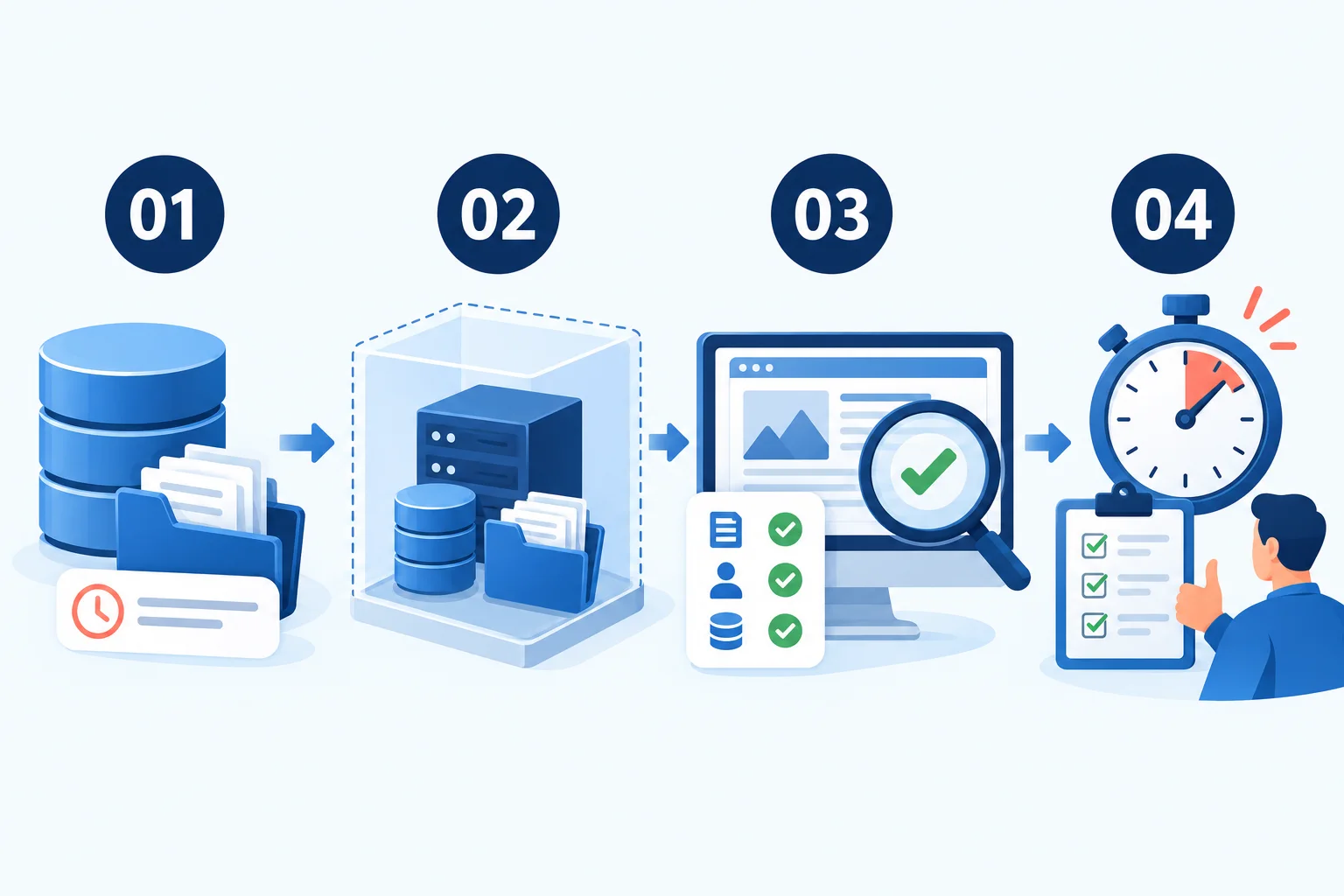
- Select the copyIdentifiable files, database and date
- Restore in isolationSeparate destination, outgoing actions disabled
- Verify the serviceCheck pages, access and data
- Record and decideActual duration, gaps and owner

Backup practices: Cybermalveillance.gouv.fr.
Yesterday’s backup cannot recover all of today
Fictional teaching example, not a client result or a market benchmark.
A service stops at 15:00. Its latest usable backup is from 03:00 and tested recovery finishes at 17:00. These fictional times distinguish potential data loss from recovery duration.
On a small screen, scroll horizontally to read every column. You can focus the table area and use the left and right arrow keys.
| Time | Event | Consequence |
|---|---|---|
| 03:00 | Latest usable backup | Data recovery point |
| 15:00 | Service interruption | Twelve hours of changes may be missing |
| 15:00–17:00 | Restoration and checks | Two hours until the service is usable |
| 17:00 | Critical journey tested | Recovery validated within the tested scope |
The potential loss window is twelve hours; observed recovery takes two hours. An archive that exists and opens is insufficient: check content, access, files and the task users need to complete.
If twelve hours of changes are unacceptable, adjust backup frequency and examine how recent changes can be recovered. Keep an isolated copy and control access; backups reachable through a compromised account can also be affected.
Simulate in an authorised environment without replacing production. Repeat the test after substantial application, configuration or procedure changes.
What to record before deciding
Keep the backup date, restored scope, duration, checks, missing data, required access and person authorising return to service.
A record to keep with the decision
| Item | Evidence |
|---|---|
| Scope | Services, data and dependencies to restore. |
| Objectives | Target time and acceptable data loss agreed with the activity owner. |
| Exercise | Chosen copy, isolated environment and test journeys. |
| Result | Duration, present data, gaps, corrections and acceptance decision. |
Frequently asked questions
My host already backs up the site: should I test?
Yes. Check contractual scope, retention, delays and recovery arrangements. Testing confirms what can actually be restored and what remains your responsibility.
Is the newest copy always the best?
It may contain the defect or deletion you are trying to correct. Identify a version suited to the incident and verify it in an isolated environment before recovery.
Reference material
Cybermalveillance.gouv.fr · Sauvegardes
The practical checklist is an editorial synthesis to adapt to your service. It does not constitute a certification or an audit result.